
High-performance Gantt engine
A custom Canvas renderer with row and time virtualization handles thousands of activities — drag, resize, link, and zoom without lag.
Ganttra pairs project planning and CPM Gantt scheduling with cost-loaded activities, live cash-flow forecasting and resource planning, numbered review rounds with one-click approvals, and client-ready reports — purpose-built for construction and project teams.
Create your Free account instantly. Eligible accounts can also try Ganttra Pro for 14 days with no credit card.
Built for real project work
From the first WBS row to a frozen Review round and board deck, Ganttra keeps cost, resource load, and stakeholder sign-off in one fast workspace.
A custom Canvas renderer with row and time virtualization handles thousands of activities — drag, resize, link, and zoom without lag.
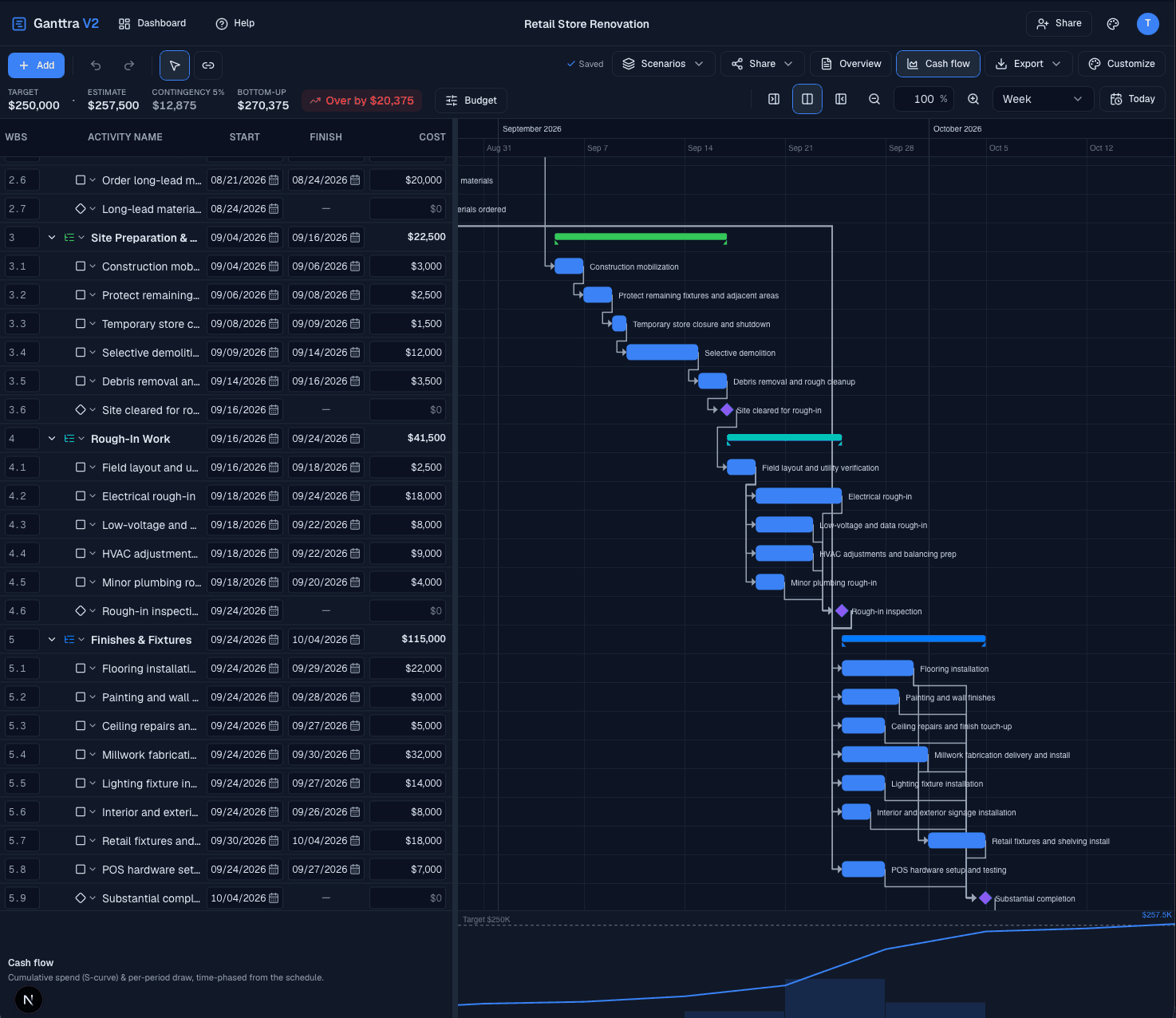
Model direct cost, contingency, and markup on every activity. Watch cumulative S-curves, monthly draws, and peak exposure as you edit.
Toggle weekly assigned hours beneath the Gantt. See who is stacked when, hover for per-resource detail, and track cumulative hours as the schedule moves.
Freeze a numbered Review round, send a no-login approval link, and collect Approved, Approved with comments, or Changes requested — with email reminders and in-app notifications.
Slice critical path, low float, late work, or unassigned tasks with saved filters. Search highlights matches in place, while the status bar keeps project totals and baseline variance in view.
Turn a project brief into phased WBS starting points. Pro's 600-credit monthly pool is shared with Superintendent so you can use it where it matters most.
Also included
Inside Ganttra
Every screen is designed for clarity under pressure — rich lines, readable type, and the money, hours, and approval context you need in the moment.
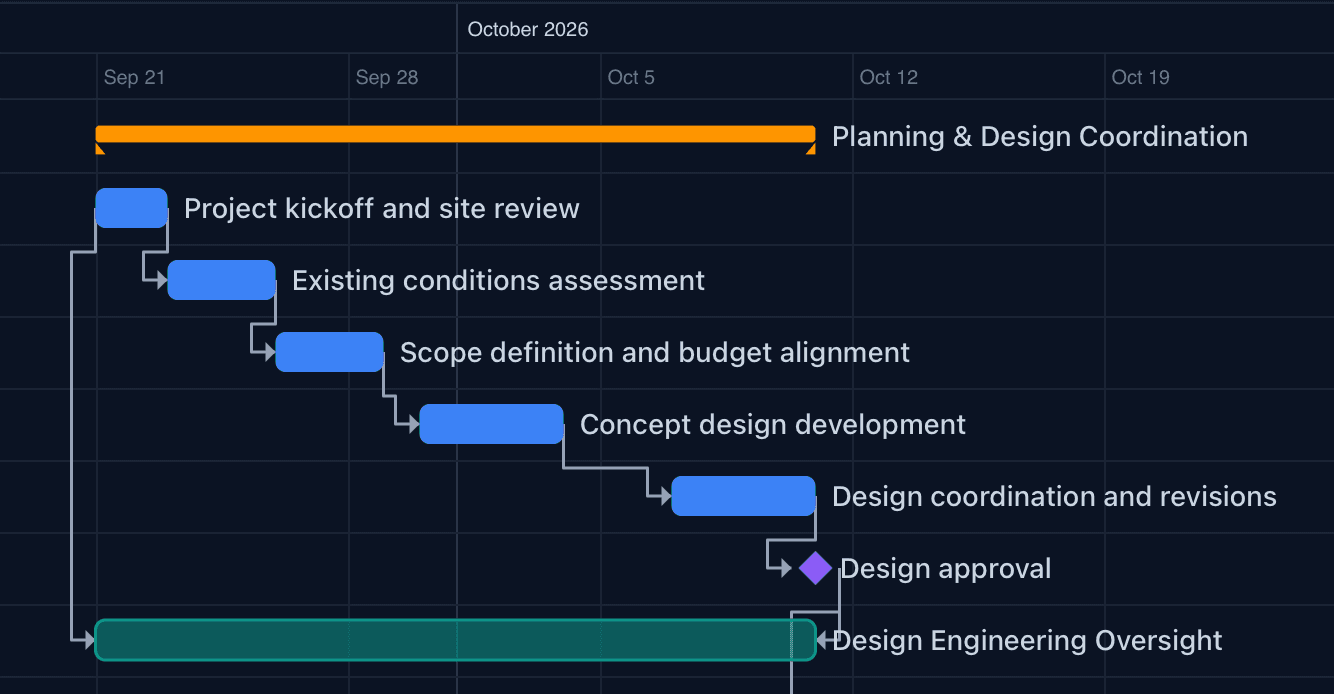
Hour through Year timescales, dependency arrows, weekend shading, and per-project themes — plus filters and in-place search so the critical few never hide in a long WBS.
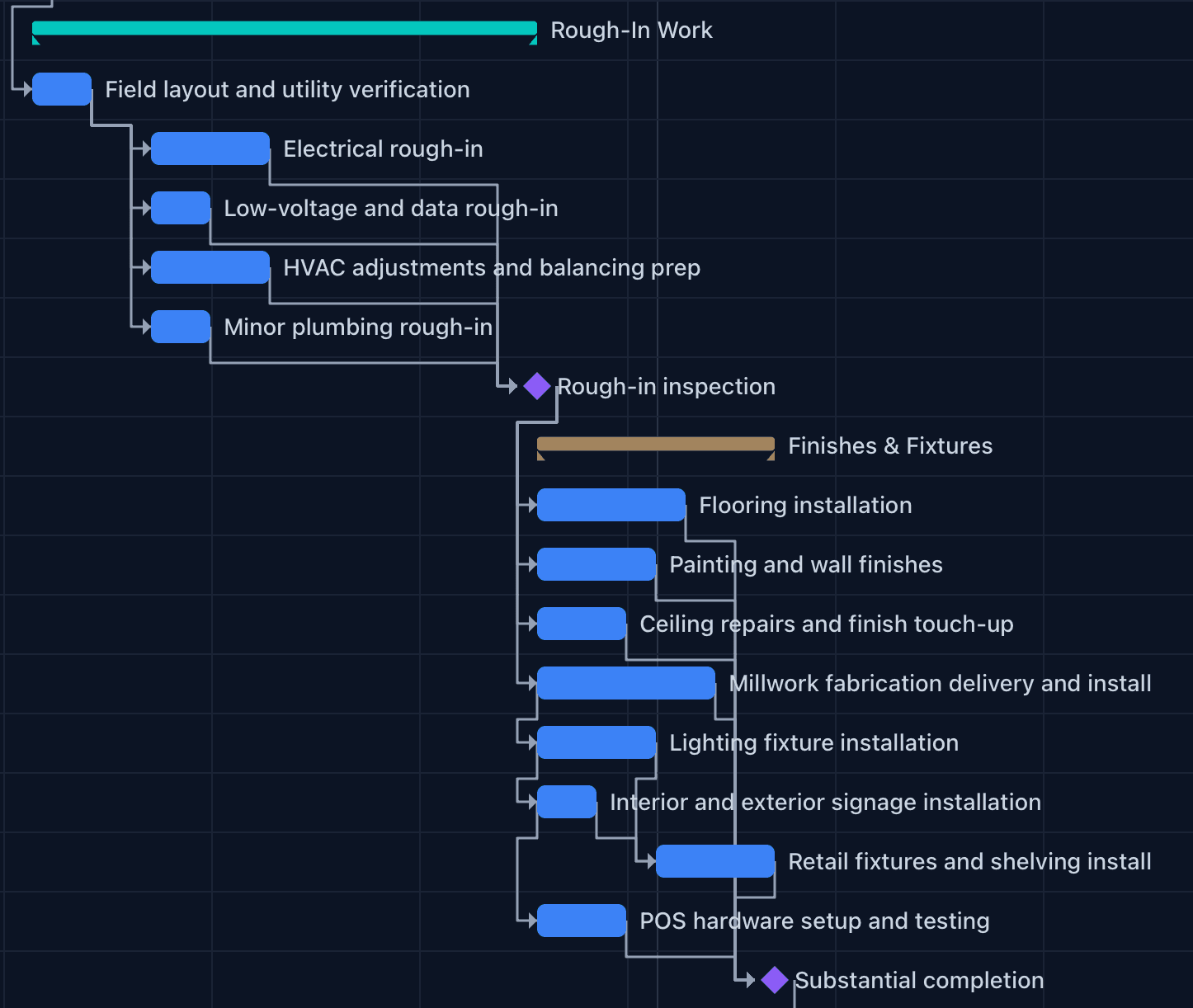
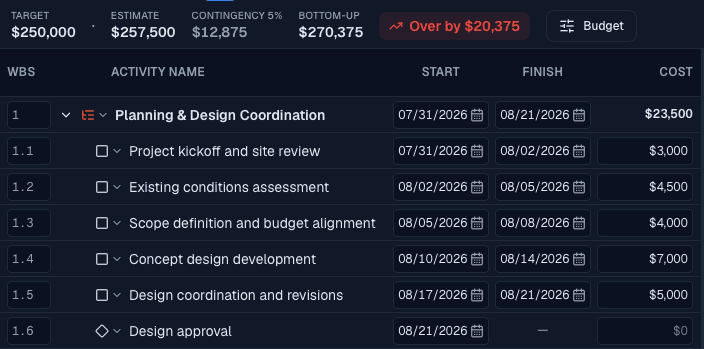
Virtualized WBS tree with inline editing for dates, costs, and relationships — always in sync with the chart, and paired with a status bar that tracks duration, critical path, and baseline variance.
Drag a bar and see peak cash impact in real time. Flip to Resource load for weekly assigned hours and a cumulative line — both charts share the same footer so financial and staffing views stay one toggle apart.
Overview narratives, concept images, and S-curve charts flow straight into client-facing PDFs and editable PowerPoint decks.
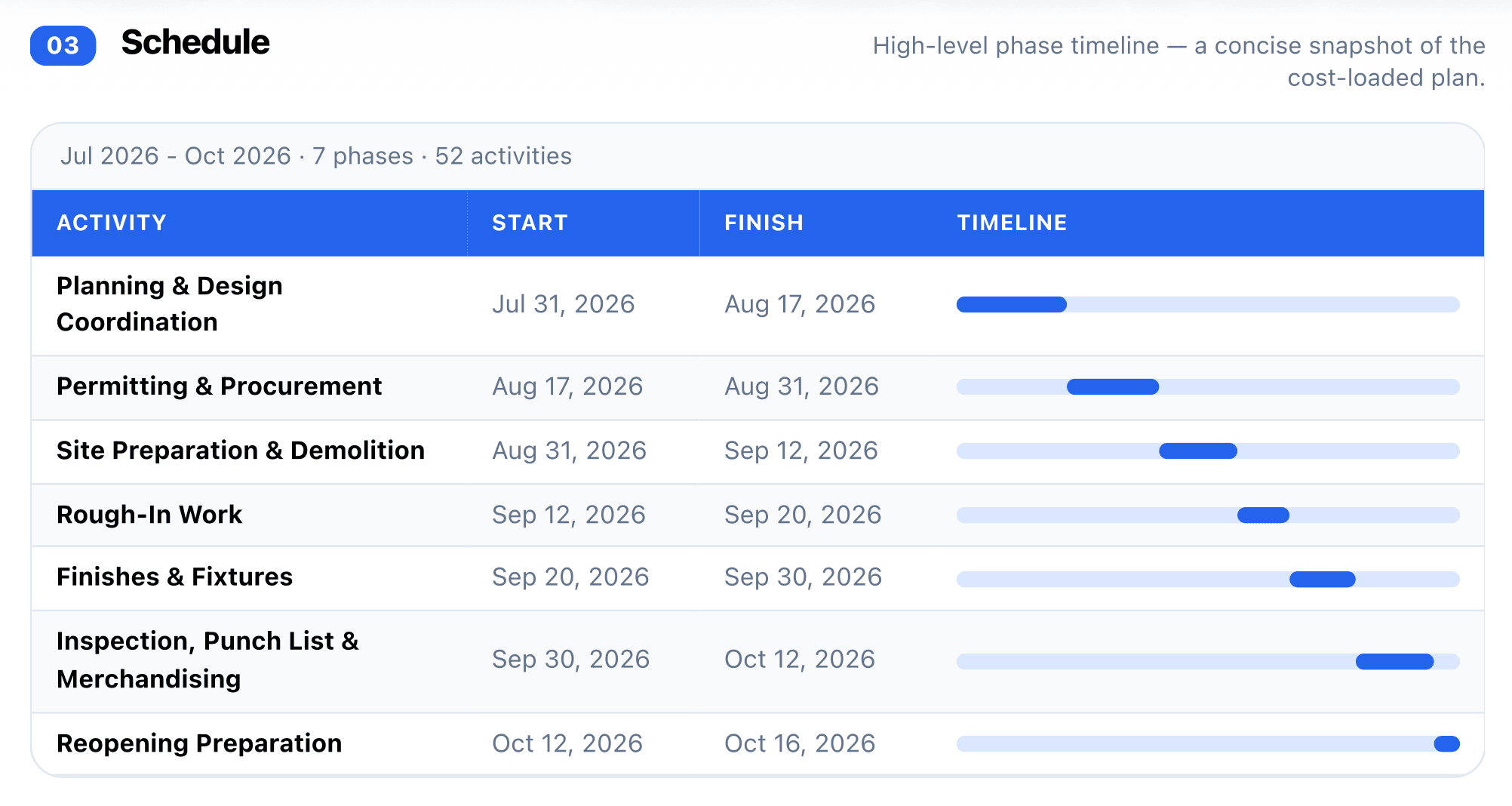
External review sites fold markup into prices. Internal sites expose margin, contingency, and draw schedules. Numbered Review rounds lock the snapshot while approvers respond — no login required.
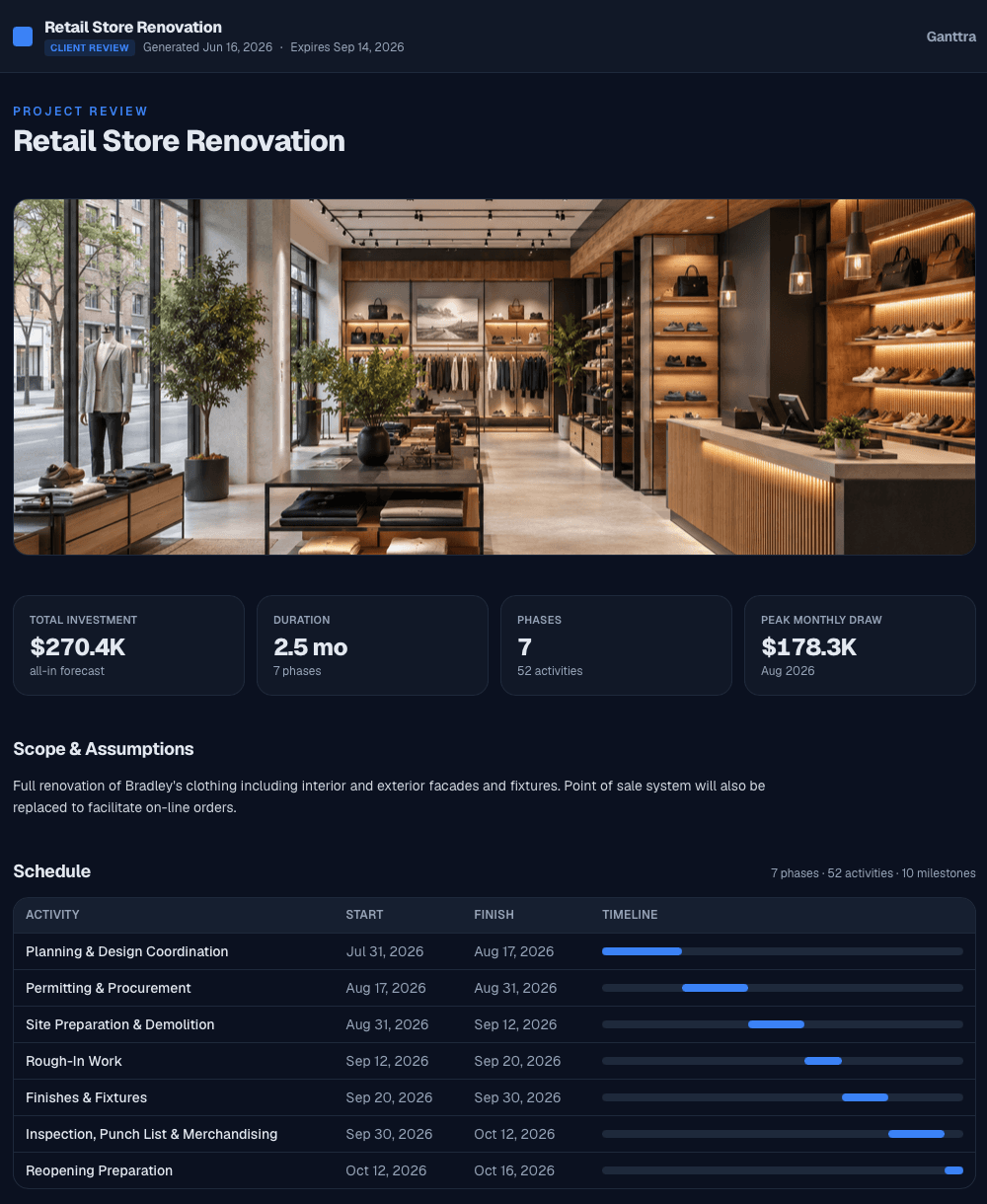
Pricing
Start instantly on Free with no card, or choose Core or Pro. Annual plans save about 17% compared with paying monthly.
Professional scheduling for one editable project.
$0/ month
Billed monthly · cancel anytime
Unlimited planning, financial workflows, and exports.
$9.99/ month
Billed monthly · cancel anytime
Advanced controls, portfolio workflows, and shared AI.
$19.99/ month
Billed monthly · cancel anytime
600 AI credits per month
A higher-capacity AI schedule assistant with a dedicated monthly credit pool.
$19.99/month add-onor Pro + Superintendent for $34.99/month
AI credits reset monthly. Basic generations cost 1 credit, Standard costs 2, and Detailed costs 4. Failed generations do not consume credits.
FAQ
Everything you need to know about planning, reviewing, approving, and exporting with Ganttra.
Anyone who needs to plan high-level, cost-loaded schedules quickly — and hand stakeholders something polished without exporting to a dozen other tools.
Every activity carries direct cost, contingency, and markup, so your schedule doubles as a budget and cash-flow forecast. Resource load sits on the same timeline, and as you drag bars, S-curves and weekly hours update in real time.
Move a project into Review to freeze a numbered snapshot. Optionally send an approval Review Site — External for client-safe pricing or Internal for full margin detail. Approvers respond with Approved, Approved with comments, or Changes requested; you get a bell notification and email, and can nudge pending requests after 24 hours.
No. Review Sites generate snapshot-backed, no-login links. Share a client-safe External site that folds markup into prices, or an Internal site with full margin and draw detail — and revoke access anytime.
Free includes one editable project with up to 100 activities, the full Gantt and CPM engine with critical path, and External Review Sites. It requires no card and does not include AI or the template library.
The 14-day Ganttra Pro trial includes Pro features and the shared monthly AI pool. When it ends, you continue on Free. Choose one project to keep editing; other projects remain viewable and exportable. Existing activities are preserved, including those above 100, but adding activities at the limit requires Core. You can change your Free project once every 7 days.
Ganttra Pro includes 600 credits per UTC month shared by template generation and Superintendent. The Superintendent add-on contributes another 1,500 dedicated monthly credits, higher context, and no daily attempt limit.
Yes. Import activities via CSV, and export to client or internal PDF, editable PowerPoint, MS Project XML, and CSV so your plans move freely between tools and stakeholders.
Ready to plan with confidence?
Create a Free account instantly with no card. Eligible accounts can also explore Ganttra Pro for 14 days.
Create your account